
How We Add Multiple Services Under One Department
If you want to enter the services under any specific department.
First, you have to go to the services section, given above on the department option located as a subsection of services.
Click on the service option. It shows you a new window.
This page allows the user to enter basic service information, sale information, and VAT information.
Create new service accounts one by one.
Basic Information
- First enter the service title that a company has been using or providing. E.g., network service and maintenance, software installation and support, cloud services, etc.
- Click and select the department group from the drop-down section.
Remember: You must have a department before adding any service.
- Enter service description in the given space. E.g., IT service has been provided for the last 3 years.
Sale information
- Enter sale price of the product, e.g., AED 1500
- Enter the currency in which the buyer made payment. E.g., AED
- Click and select VAT tax rate applied to the service, e.g., Standard (5%)
- Enter the discount rate if it is provided by the supplier. E.g., 10%
- After entering all information in it. Click on the Save button.
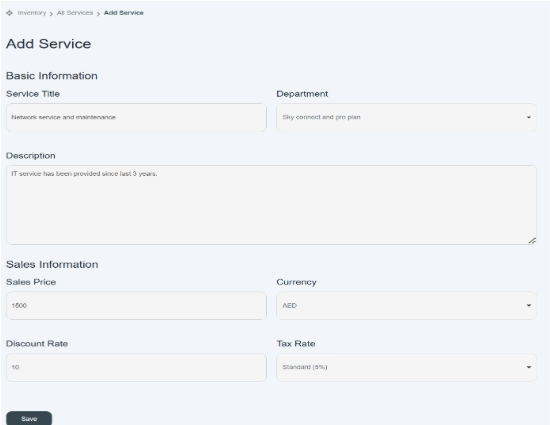
- Once you enter all information, click on the save button, and your service information will be saved in the system and displayed on the existing list of services.

Go back to department section
Now go back to the department section; the system automatically allocates your service name to its related department category because in the “select department field,” you choose the department name and group category in order to link the service to any specific group.
- By clicking on the main department head, you can view all services that have been assigned to specific departments. These allocated services are displayed under the respective department head and are highlighted in red for clear identification.
- The number of services in a department is also mentioned along with the ‘edit icon.’
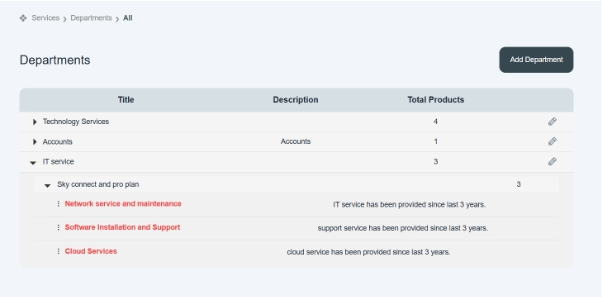
These below subsections are not editable, but you can edit the title name by clicking on the edit option given on the right side of the column.
If you want to edit the service name or location of service, go to the service section and follow the steps as explained before.
