Non-Current Asset Analysis
Click on asset name to analysis the details.
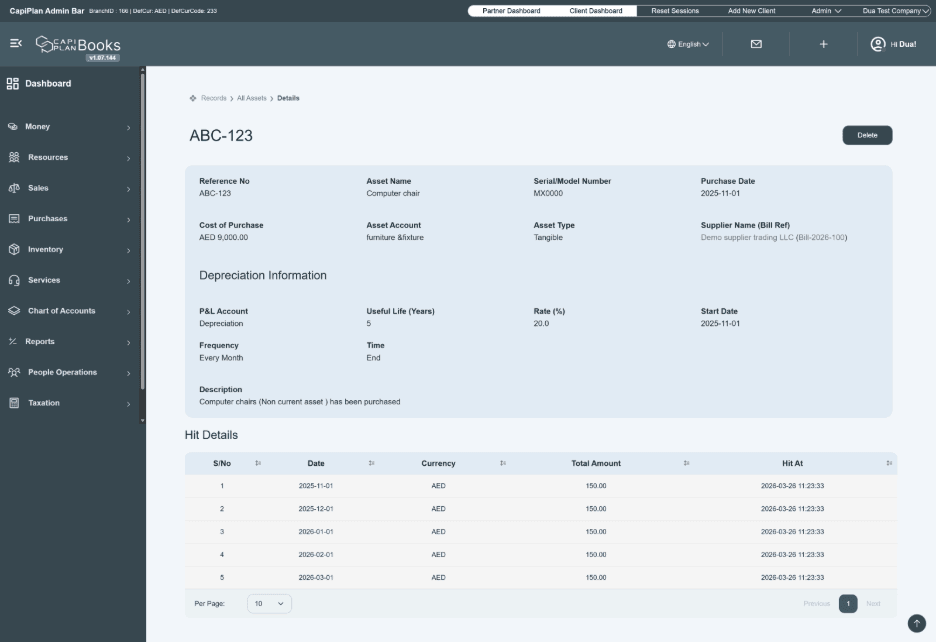
This screen displays the complete details of a recorded asset, including its basic information and depreciation schedule.
- Asset Overview
At the top, you can view key asset details
- Reference No: Unique ID of the asset
- Asset Name: Name of the asset
- Serial/Model Number: Identification number of the asset
- Purchase Date: Date when the asset was purchased.
- Cost of Purchase: Net cost of the asset (excluding VAT).
- Asset Account: Account head under which the asset is recorded
- Asset Type: Indicates whether the asset is tangible or intangible
- Supplier Name (Bill Ref): Linked supplier and bill reference
- Depreciation Information
This section shows how depreciation is applied
- P&L Account: Account where depreciation expense is recorded
- Useful Life (Years): Total life of the asset
- Rate (%): Depreciation percentage applied
- Start Date: Date from which depreciation begins
- Frequency: Depreciation applied (e.g., monthly)
- Time: Indicates the duration/status of depreciation
- Description: Additional notes about the asset
- Depreciation Schedule (Hit Details)
This table provides a detailed breakdown of depreciation entries:
- S/No: Entry number
- Date: Depreciation posting date
- Currency: Currency used
- Total Amount: Depreciation amount for each period
- Hit At: Date and time when the entry was recorded in the system
- The system automatically generates this schedule based on:
Useful life
Depreciation rate
Selected frequency (monthly/annual)
Important Note
- The depreciation schedule is automatically created from the start date up to the current period, ensuring accurate financial tracking.
- Additional Actions
- Delete Button: Allows you to remove the asset record (if required).