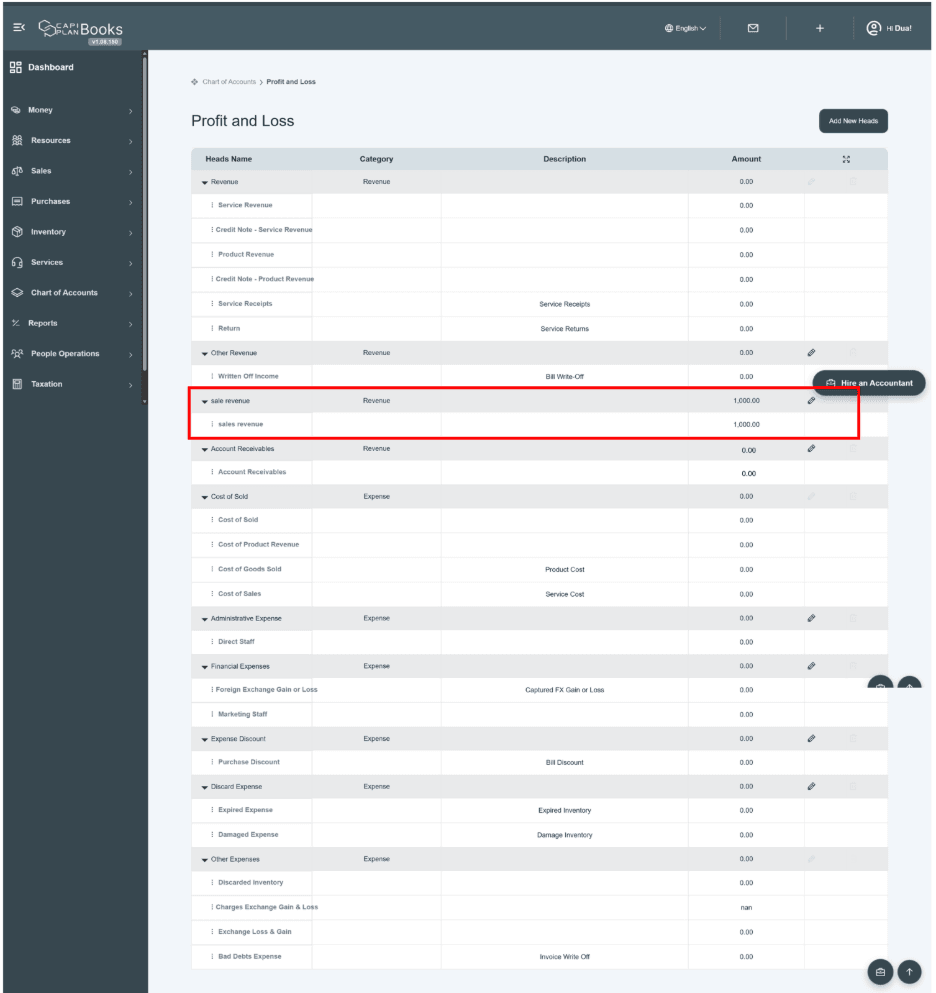
How to add account code in existing accounts head
There is an edit icon  given along with each account head row. Click on the icon given on the right side of each main head row. Click on it, and it will show you the previous pop-up window, allowing you to add or update the information.
Along with the edit icon, there is also a delete / trash icon provided but available for those heads that are created by the user, not for all heads. If you want to delete any account head, click on the trash icon and confirm the delete request. Your head will be deleted permanently.
Only those heads can be deleted which do not contain any amount.
Heads with entered amounts cannot be removed to maintain accuracy and prevent data loss.
Table Summary
There is a table given here that consists of columns for revenue heads, expense heads, balances for each head, descriptions, and categories for each head.
- Title name—The main heads are given in the form of expandable sections; there are sub-accounting heads available under the main heads as a subsection.
- Category—The category column shows you the accounting type, such as whether the head belongs to revenue or from expense.
- Description—The description column shows you the short explanation or purpose of the label of the account. It helps users to understand the background information of each head.
- Amount—The Amount column will show you the balance of each account.

- How to add amount in respective account code
Recording Amounts
- Users can add amounts via invoices, bills, or journal entries.
- Select “Others” in the Item field to enable the Account field.
- Only user-created Profit & Loss account codes will appear for selection.
- After submitting the transaction, the amount is automatically posted to the selected account head.
The amount is based on journal entries. We can add amounts in the respective heads by creating their journal entry, located in the resources section.
Important Note:
- The system will only display those account codes that are created under the Profit & Loss heads.
- Users can select only the accounts that they have previously configured based on their business requirements.
- Submit Transaction
After selecting the account code and completing the entry, submit the invoice, bill, or journal entry.
Result:
- The entered amount will automatically be posted to the respective Profit & Loss head.
- It will be reflected in the financial reports under the selected account category.