
Transfer
Transfers basically is the movement of money from one account to another within the same organization. e.g. (Bank to Bank Transfer, Bank to Cash Transfer)
How to record Transfer from Company Bank Account
- Click on “Transfer” option as given in the above picture.
- A new window comes on your screen, you can see in given picture
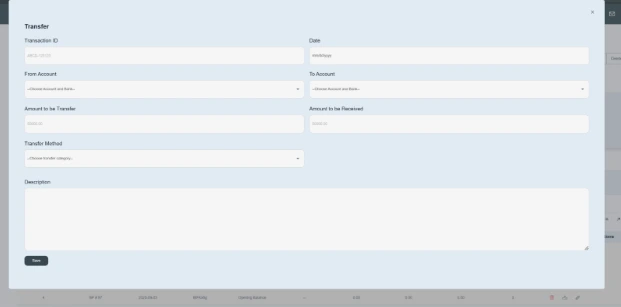
- Enter the Bank transaction id provided by the bank e.g. ABCD-13455
- Enter the date on which the transaction occurred. e.g. 11/08/2025
- Enter the account name from where money is being taken out. E.g. Mashreq b- ABCD trading…XXXX000-AED
- To account for a bank name means where money would be deposited or sent by the company. E.g. Bank of Punjab.
- Enter the amount. e.g. AED 500000
- The amount to be received would be the same as the amount to be transferred.
- Click on the payment option and select the payment method, e.g. Bank transfer.
- Write a brief description of it. E.g. An amount of AED 500,000 has been transferred from Mashreq Bank to the Bank of Punjab as payment for the services we provided on 11/8/2025.
- Then click on the submit button.

- Once it is saved, the user will analysis it by double clicking on the bank name and this transaction will be recorded in transaction details.
- You can edit it, remove it, and download it from the transaction details.
