
1. Add loan option
Click on the add loan option.
This option is also used to maintain a loan account. Click on it, and a new window will appear on your screen. You must mention all the necessary details to add loan information.
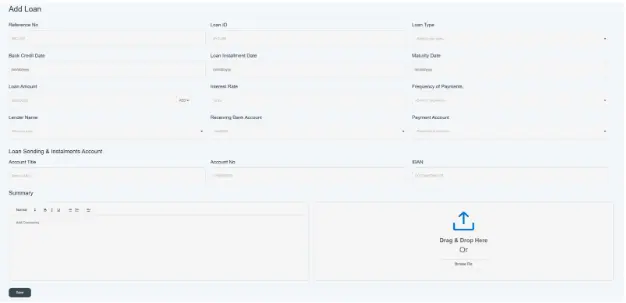
Click on Add loan
- First, you must mention the reference number provided by the bank for the loan (e.g., ABC-456).
- Click on the loan id provided by the bank. E.g. XYZ-452
- Click on loan type and select what type of loan in it e.g., vehicle.
- Select the bank credit date, which means the date on which the loan amount is credited to your bank account. E.g. 10/01/2025
- Then select the loan installment date, the date when the first installment is due. e.g. 11/10/2025
- Click on Maturity date, the date when the loan will be fully repaid. E.g. 01/12/2026
- Mention the loan amount, which means the total principal amount borrowed. E.g. UAE 100,000), and also select your currency.
- Provide the interest rate and the interest rate applied to it. e.g. 10.2%
- Choose the frequency of payment for how often installments are made. E.g. monthly, quarterly, annually. Etc.
- Select or enter the lender name providing the loan. E.g. Mashreq Bank.
- Choose the receiving bank account where the loan funds are received. E.g. 013900000000
- Select the payment account from which loan repayments will be made. E.g. Mashreq Bank. 0454000000.
- In the loan sending & installment account, mention all bank details from which you will pay the loan amount or installment amount.
- Account title—the name of the account holder from whom the loan amount will be paid. Mashreq bank
- Account no- the account number of banks. 019290000
- IBAN—IBAN of bank accounts. AE9200000000000
- Click on a summary; you have to write a brief description related to the loan information.
- Click on “Drag and drop” here and attach any supporting evidence or receipt given by the bank. Please remember this section is mandatory.
- Then click on the save button.

- The loan brief summary will be created and displayed on the front screen of the bank account details, as shown in the picture below.

Through the following method, the user can add loan details.
