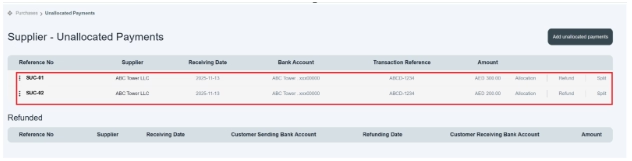
How to Split an Unallocated Payment
“Split payments” mean dividing one payment into two separate payments. If the buyer wants to divide one unallocated payment into two or more separate payments to the supplier, they can use the Split Payment option. The Split option allows the user to divide the total payment amount into multiple parts. This provides flexibility also in managing refunds.
- This option is available on the left side of the unallocated payment table, i.e., Allocate | Refund | Split. If you know, an unallocated payment is made in split form. Then we record split-unallocated payments.
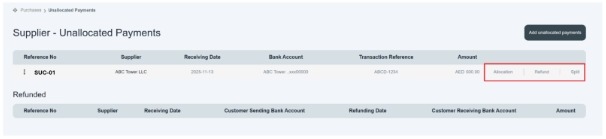
Click on Split option.
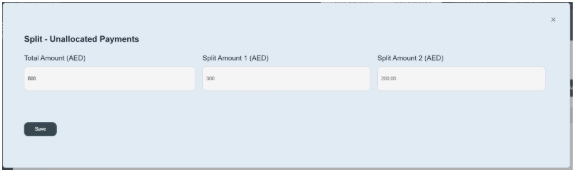
- Click on the split option; a new page opens in front of you.
- Click and enter the full unallocated amount. e.g. AED500
- Enter split amount one and then enter second amount, e.g., AED300, and in second section, system would automatically deduct next remaining amount, i.e., AED200.
- Then click the Save button in it.
- Once you save the information, it will be displayed on the main table of the supplier’s unallocated list.