
6. Payment Procedures for Bills
if you want to know about how we can proceed payments against the bill, for that purpose you have to go for Add Payment button.
Click on the “Add Payment” button.
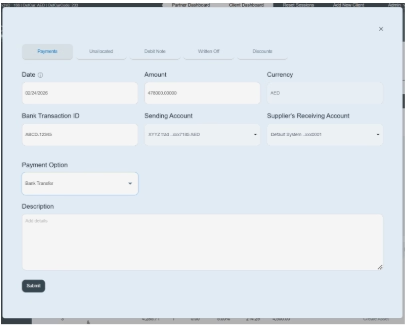
When you click on “add payment option,” it shows you a new pop-up window.
This window will allow you to make the payments against the bill. Payment, unallocated, debit note, written off, and discount following procedures are managed through the “Add Payment” button.
Fill The Following Information
- First enter date on which you paid payment to supplier. E.g., 02/24/2026.
- Enter the amount you intend to pay. If you want to make a full payment, enter the total amount. If you want to make a partial amount, the remaining balance will be automatically updated in the outstanding balance.
- “Enter currency” means in what currency amount you paid, e.g., AED, USD, etc.
- “Enter bank transaction ID” means a unique reference number provided by the bank and mentioned on bills, e.g., ABCD-12345.
- “Enter sending account” means the bank account of the company from where the money will be paid. E.g., XYYZ Trading Company LLC.
- Supplier receiving account—Enter the supplier’s receiving account in which the payment will be received.
- “Add payment option” means which method you are using to make payment. E.g., bank transfer, cash, online transfer, check, etc.
- Enter a brief description or any important instruction related to payment. E.g., payment has been paid on 02/24/2026.
- Then click on the Submit button, and you will see this transaction on the payment history on the front screen.
How to delete the payment against the bill: If you want to delete this payment information, go to the specific bill’s detail window. Go to the payment history section; there is a red icon given on the left side of the payment table. Click on it and confirm the permission to delete the payment. In this way, you can delete a specific payment from history.
