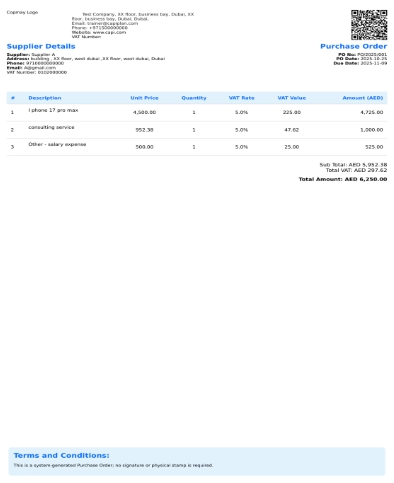
How we Download PDF of PO
Users can download purchase orders in PDF form by clicking on the Download button.
Users can also download POs from the main screen, where all existing POs are listed in a table. There is an icon  given to export the data into any format, like CSV or PDF form.

This pdf shows the information such as,
- Displays the purchase order with the company logo and document title.
- Shows supplier details including name, contact number, email, and VAT number.
- It contains PO information such as purchase order number, PO date, and due date.
- The table shows you the received product details, including description, unit price, quantity, VAT rate, VAT value, and amount (AED).
- It includes a QR code for quick verification or reference.
- Total financial will be shown below the table; it includes subtotal, total VAT, and total amount in that currency.
- It provides a Terms and Conditions section stating the document.