
How do we add discount information to the invoice?
Discount means reducing the original price of a product/service by an amount.
e.g., if the discount is 10%, then the discount would be charged on the overall price.
Click on discount option.
- First click on the discount option, located in the add payment section (given in the action button).
- Click on it. A new page opens in front of you.
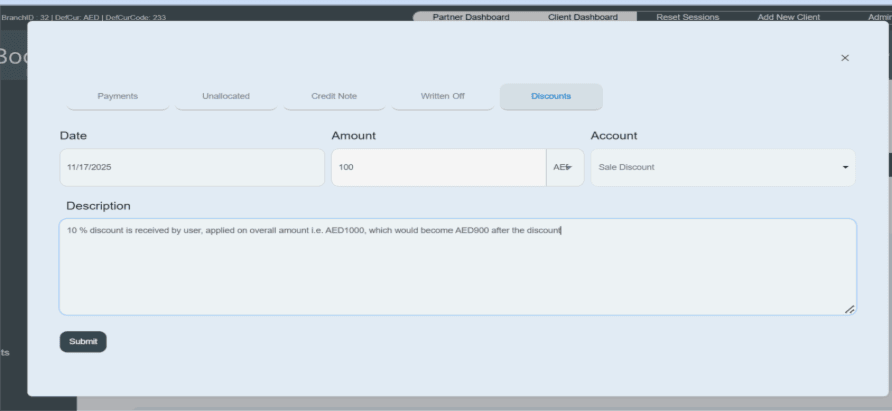
- First enter the date on which the discount invoice occurs in accounts. 11/13/2025
- Then enter the discount amount (enter the discounted amount you received on the overall payment).
- Select your currency like AED.
- The system already shows you the accounting category of the account, such as “sale discount.”
- Write a short description in the given space. E.g., a 10% discount is received by the customer, applied on the overall amount, i.e., AED1000, which would become AED900 after the discount.
- Then click on the submit button and save the information.
- Once you submit the information, payment will be displayed in the given payment history.
- You can also delete this payment invoice from the payment history section.
- There is a red icon given on the right side of the payment invoice. You can click on it and delete the invoice if you do not need it.

All these features explain their respective functionality and demonstrate how invoices are processed and recorded in the Capi Plan Books system. They provide a clear understanding of how invoices are created, managed, updated, and reflected in the accounting records.
