How we add written-off (bad debt expense)
Written-off (bad) debts are amounts owed by customers that a business is unable to collect. Bad debt refers to an amount that has been officially recorded as receivable but has not been received. When it becomes clear that the amount is no longer recoverable, it is treated as an expense. In such cases, the outstanding balance is written off and recorded as a bad debt expense.
For example, the customer pays due to the financial crisis, or the customer disappears or refuses to pay.
To add written-off information, first open the invoice in which you are adding written-off payment information. There are action buttons given; go and click on them, and a pop-up window will appear on your screen. There are options given; click on the write-off payment option.
Navigation path: open the “Invoice” < “add payment” button < “written off”

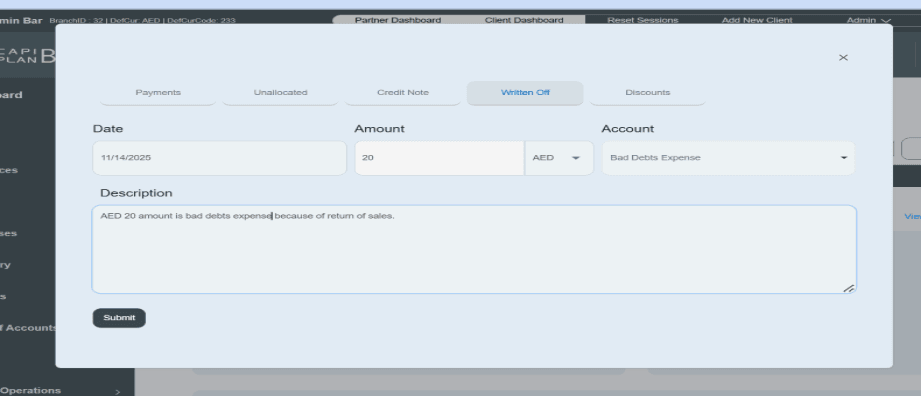
Click on the “Written off” option.
- First enter the date on which the written-off invoice occurs in the account.
- Then enter the written-off/bad debt amount and select your currency.
- The system already shows you the accounting category of the account, such as bad debts expense.
- Write a short description in the given space. E.g., the AED 20 amount has been recorded as a bad debt expense.
- Then click on the submit button and save the information.
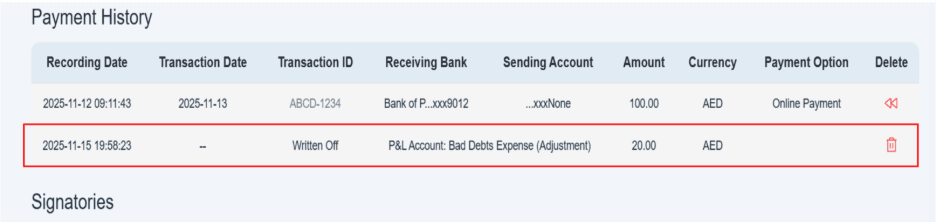
- Once you submit the information, payment will be displayed in the given payment history.
- You can also delete this amount from the payment history section.
- There is a red trash icon given on the right side of this payment. You can click on it and delete the information.