
Product/Service Details Section
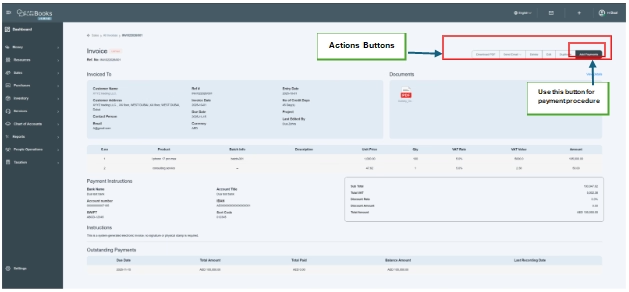
Then we have a complete financial overview of the invoice, including item details, VAT calculation, totals summary, payment instructions, and outstanding balance tracking. It helps users verify invoice accuracy, monitor payment status, and share payment information with the customer.
This table displays all items or services added to the invoice.
Field Explanation:
- S.No.—Serial number of the item for reference.
- Product Name: The name of the product or service being billed (e.g., iPhone 17 Pro Max, Consulting Service).
- Batch Info—Displays the batch number (applicable only for inventory-based products where batch tracking is enabled). Services may show “–.”
- Description-Additional notes or specifications related to the item.
- Unit Price—Price per single unit of the product or service.
- Qty (Quantity)—Total number of units sold.
- VAT Rate—Applicable VAT percentage (e.g., 5%).
- VAT Value-Automatically calculated VAT amount based on quantity and unit price.
- Amount Total: Line amount including VAT for that specific item.
- Financial Summary- The system automatically calculates the subtotal, total VAT amount, discount rate, discount amount, and total amount. This reduces manual errors and ensures compliance with VAT regulations. All calculations are system-generated and auto-updated.

Payment Instructions Section
This section provides official bank details for receiving payment. These details allow the customer to transfer payment directly to the company’s account.
- Bank Name
- Account Title
- Account Number
- IBAN
- SWIFT Code
- Sort Code
Instructions Section
This section displays additional notes related to the invoice.
For example,
“This is a system-generated electronic invoice; no signature or physical stamp is required.”
This confirms that the invoice is digitally valid and does not require manual authorization.
Outstanding Payments Section
This section shows the real-time payment status of the invoice. This section also helps determine whether the invoice is unpaid, partially paid, or fully paid.
Fields Explanation:
- Due Date
The last date by which payment must be made.
- Total Amount
Total invoice amounts payable.
- Total Paid
Amount already received from the customer.
- Balance Amount
Remaining unpaid amount.
- Last Recording Date
Date when the last payment was recorded.
Example:
- Total Amount: AED 105,050.00
- Total Paid: AED 0.00
- Balance Amount: AED 105,050.00
Click on these given links to know more about the functionality of “Action Buttons” or to know about “How To Book Receipts Against the Invoices.” Open the links and follow the instructions.
