ii. How To Send Email to customer through Capi Books
The Send Email button allows you to automatically send emails to inform customers or those about invoice status updates. The email can only be sent to customers whose contact information has already been added in the “Add Contact” section.
When you click Send Email, a dropdown list opens with different options.
- Email when invoice is generated.
This mail is generated to inform the customer about their payment details and payment instruction after the invoice is created.
- Email when invoice is near due.
This email generates when the due date is near. It gives a reminder to the customer before the payment date.
- Email when invoice is overdue.
This email is generated when the due date has passed and payment has not been received.
- Email when invoice is canceled.
This email is generated when an invoice is canceled or voided.
- Email when invoice is modified.
This email is generated when any information is added or removed from the invoice.
- Email when invoice payment is received in full.
This email is generated when the customer fully paid the amount.
- Email when invoice payment is received partially.
This email is an update for the customer that a partial payment has been paid.

- Format of email
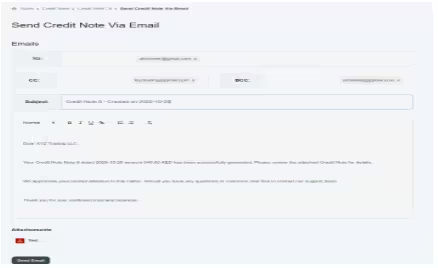
the given In the given image below, the user can see how the system sends email to customers.
- In To, you just have to enter the email address of the main recipient’s email (customer’s email). E.g., abctower@gmail.com.
- In CC, add emails of people who should receive a copy of the email. e.g., your internal team: xyztrading@gmail.com.
- In BCC, add emails that should receive a copy secretly (recipients don’t see BCC addresses). E.g., internal audit team strtrading@gmail.com.
- The rest of the part would be generated automatically in the system.
- You can also attach a document as supporting evidence.
- Then click on the save button. Your email would be sent to the customer.